
How to Fix iOS 15 Safari Broadcasting: Disable NSURLSession WebSocket
To successfully broadcast using the built-in browser app on iOS 15, you must adjust a specific setting in Safari. Follow this quick step-by-step guide to disable the conflicting experimental feature.
Step-by-Step Instructions
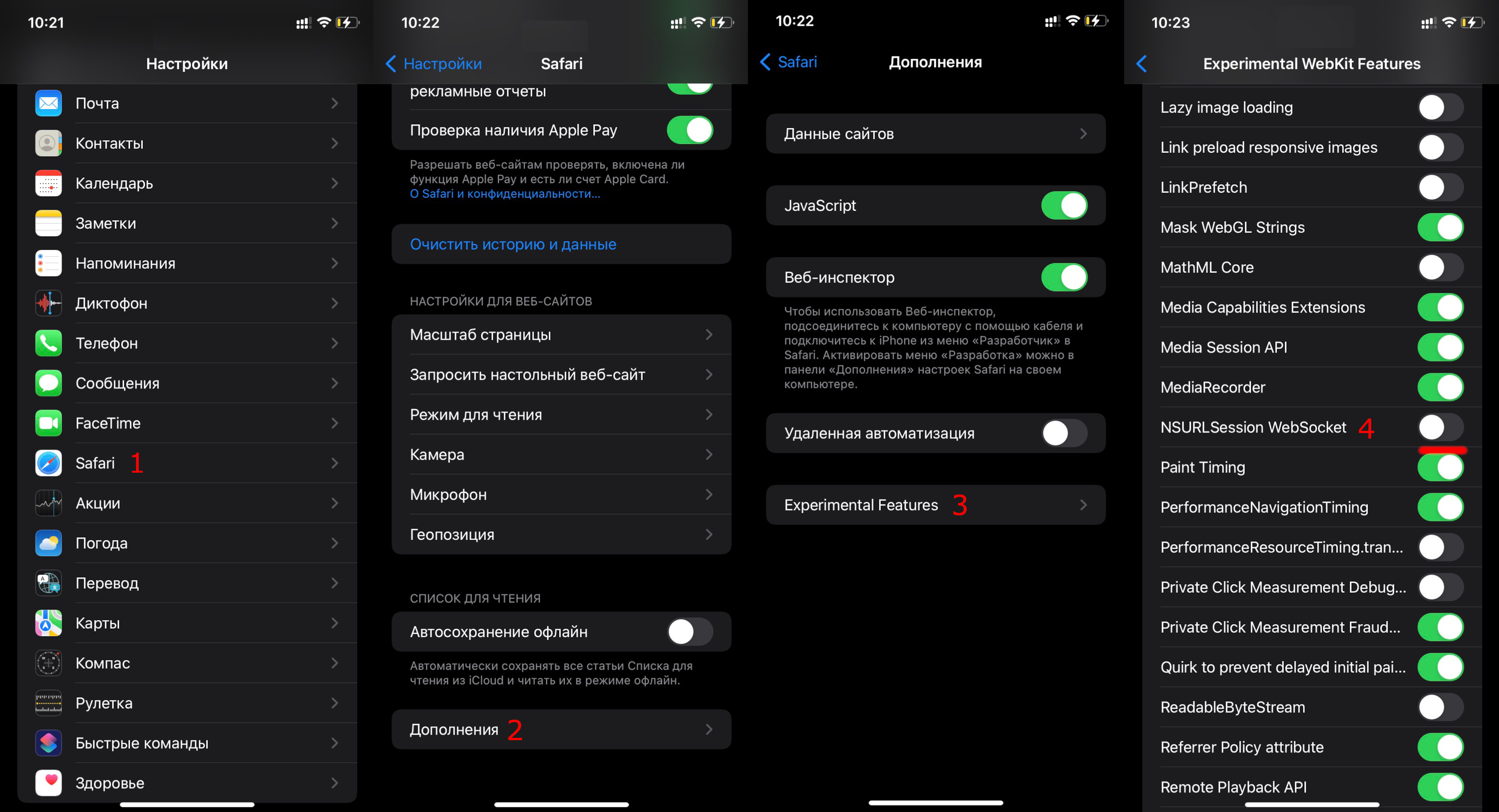
1. Open the Settings App
On your iOS device, locate and tap the Settings app.
2. Select Safari
Scroll down the list of apps and tap on Safari.
3. Navigate to Advanced Settings
Within the Safari settings menu, scroll to the very bottom and tap on Advanced.
4. Open Experimental Features
At the bottom of the Advanced settings page, tap on Experimental Features.
5. Disable NSURLSession WebSocket
Scroll through the list of experimental features until you find NSURLSession WebSocket. Tap the toggle switch to disable (turn off) this feature.
Visual Reference
✅ Done!
After disabling this feature, the browser will no longer block the connection, and you should be able to broadcast successfully using the built-in browser app on iOS 15.