
Boomstream Player Configuration Parameters: Complete Reference Guide
You can customize the behavior and appearance of the Boomstream video player by adding specific parameters to the media URL. Some parameters affect the video preview window, while others control playback, UI elements, and authorization.
Below is the complete, categorized list of available parameters.
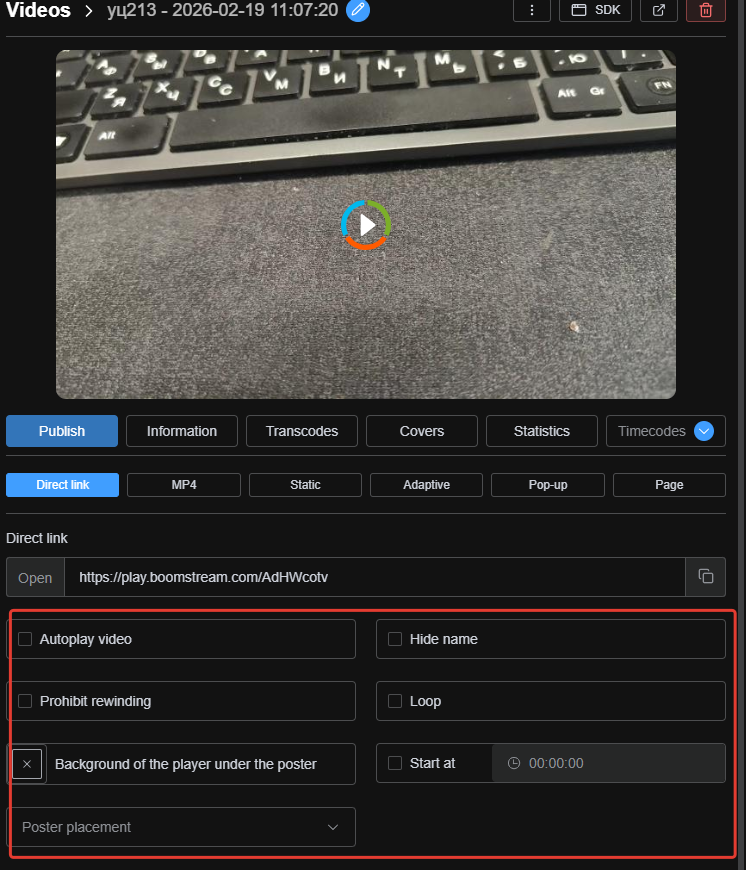
How to Add Parameters to the Player URL
To add a parameter, append a question mark ? to the end of the media link, followed by the parameter and its value.
Example (Single parameter):
https://play.boomstream.com/VCcNtuiw?title=0
To specify multiple parameters, use ? before the first parameter and an ampersand & before each subsequent one.
Example (Multiple parameters):
https://play.boomstream.com/VCcNtuiw?title=0&rewind=0&controls=0
Full List of Player Parameters
For easier navigation and AI parsing, the parameters are grouped by their primary function.
? Playback & Behavior
| Parameter | Description |
|---|---|
autoplay=1 |
Autostarts the media. Note: Playback always starts muted due to browser security policies. |
start=0 |
Sets the starting time of video playback in seconds. |
rewind=0 |
Disables video seeking (rewind/fast-forward). |
speed=2 |
Forces the video to play at the specified speed (e.g., 2 for 2x speed). |
autopause=1 |
Automatically pauses playback when the player scrolls out of the visible screen area. |
muted=1 |
Mutes playback. (Added automatically when autoplay=1 is used). |
background=1 |
Optimizes the player for background videos. Automatically applies: title=0, autoplay=1, muted=1, controls=0, loop=1, autopause=0. |
?️ User Interface (UI) & Controls
| Parameter | Description |
|---|---|
controls=0 |
Removes all player control buttons and disables keyboard events on load. |
ui_controls=1 |
Forcibly shows player control buttons on load (overrides controls=0). |
ui_disable=1 |
Disables all player controls. (0 = enabled, 1 = disabled). |
ui_fullscreen=0 |
Disables the "Fullscreen" button. (0 = disabled, 1 = enabled). |
ui_settings=0 |
Disables the "Settings" button. (0 = disabled, 1 = enabled). |
ui_timeline=0 |
Disables the progress timeline. (0 = disabled, 1 = enabled). |
ui_play=0 |
Disables the "Play/Pause" button. (0 = disabled, 1 = enabled). |
ui_time=0 |
Disables the video duration/time display. (0 = disabled, 1 = enabled). |
ui_volume=0 |
Disables the volume control button. (0 = disabled, 1 = enabled). |
ui_speed=0 |
Disables the playback speed button. (0 = disabled, 1 = enabled). |
display_playlist=1 |
Automatically shows the playlist when the player loads. |
? Authorization & Access
| Parameter | Description |
|---|---|
preload=0 |
Forces the payment, password, or registration widget to appear immediately when the player loads. |
auth=no |
Forces the password/payment widget to appear every time the page with the player is reloaded. |
id_recovery=hash |
Enables seamless authorization for password-protected access. Replace hash with the actual access password. |
buyer[email]=test@test.ru&buyer[name]=John%20Doe |
Enables seamless authorization by pre-filling the registration widget with user data. |
password_button=Button%20Name |
Renames the default text on the password submission button. |
? Styling & Layout
| Parameter | Description |
|---|---|
use_full_height=1 |
Player fills the parent container's full height and is responsive in both width and height.0 = Works in aspect-ratio mode (fills full width, responsive in width only). |
color=%23ff6600 |
Sets the player background color behind the poster image (use URL-encoded HEX color values). |
size=contain |
Poster placement: contain scales to fully cover the block (default). |
size=cover |
Poster placement: scales as large as possible while preserving aspect ratio (may crop). |
size=auto |
Poster placement: fills the player while strictly preserving aspect ratio. |
border-radius="20px" |
Sets corner rounding when embedding via JS. Full attribute form: data-boomstream-border-radius="20px". |
⚙️ Advanced & Network
| Parameter | Description |
|---|---|
referrer=https%3A%2F%2Fyourdomain.com%2Fcatalog%2F |
Sets an exact referrer value. Recommendation: Always pass the URL URL-encoded. |
airplay=1 |
Enables AirPlay for macOS and iOS devices. Note: AirPlay does not work when watermark protection is enabled. |
Common Usage Examples
1. Hide Title and Disable Seeking
https://play.boomstream.com/VCcNtuiw?title=0&rewind=0
2. Background Video Setup
Automatically applies muted, autoplay, no controls, and looping.
https://play.boomstream.com/VCcNtuiw?background=1
3. Seamless Authorization (Pre-filled User Data)
Passes user email and name directly to the player to skip manual registration.
https://play.boomstream.com/VCcNtuiw?buyer[email]=student@example.com&buyer[name]=John%20Doe
4. Strict Access Control (No UI, Forced Password on Reload)
https://play.boomstream.com/VCcNtuiw?controls=0&auth=no