
Responsive Iframe for Boomstream Player: Complete Setup Guide
What is a Responsive Iframe?
Responsive design ensures your website adapts to any device and screen size — smartphones, tablets, laptops, and desktop monitors. The content automatically resizes to maintain optimal viewing experience without requiring users to zoom or scroll horizontally.
For video players, a responsive iframe automatically adjusts its dimensions based on the viewer's device, ensuring perfect playback on any screen resolution or aspect ratio.
Ready-to-Use Responsive Iframe Code
Copy and paste this code into your website's HTML. Replace the example video URL (https://play.boomstream.com/VCcNtuiw) with your own Boomstream media link.
<style>
.embed-container {
    position: relative;
    height: 0;
    overflow: hidden;
    max-width: 100%;
}

@media (min-width: 0px) {
    .embed-container {
        padding-bottom: 56.25%;
    }
}

@media (min-width: 768px) {
    .embed-container {
        padding-bottom: 56.25%;
    }
}

.embed-container iframe {
    position: absolute;
    top: 0;
    left: 0;
    width: 100%;
    height: 100%;
}
</style>

<div class="embed-container">
  <iframe width="100%" height="355" src="https://play.boomstream.com/VCcNtuiw" frameborder="0" scrolling="no" allowfullscreen=""></iframe>
</div>
Customization Guide
| Element | What to Change |
|---|---|
| Media link (src) | Replace https://play.boomstream.com/VCcNtuiw with your Boomstream video or stream URL |
| iframe width | Keep width="100%" for responsive behavior |
| iframe height | Keep height="355" — CSS will override this for responsive display |
How It Works
The responsive iframe uses:
- CSS aspect ratio technique (56.25% padding-bottom = 16:9 widescreen format)
- Media queries for different screen sizes
- Absolute positioning to fill the container
- Max-width: 100% to prevent overflow
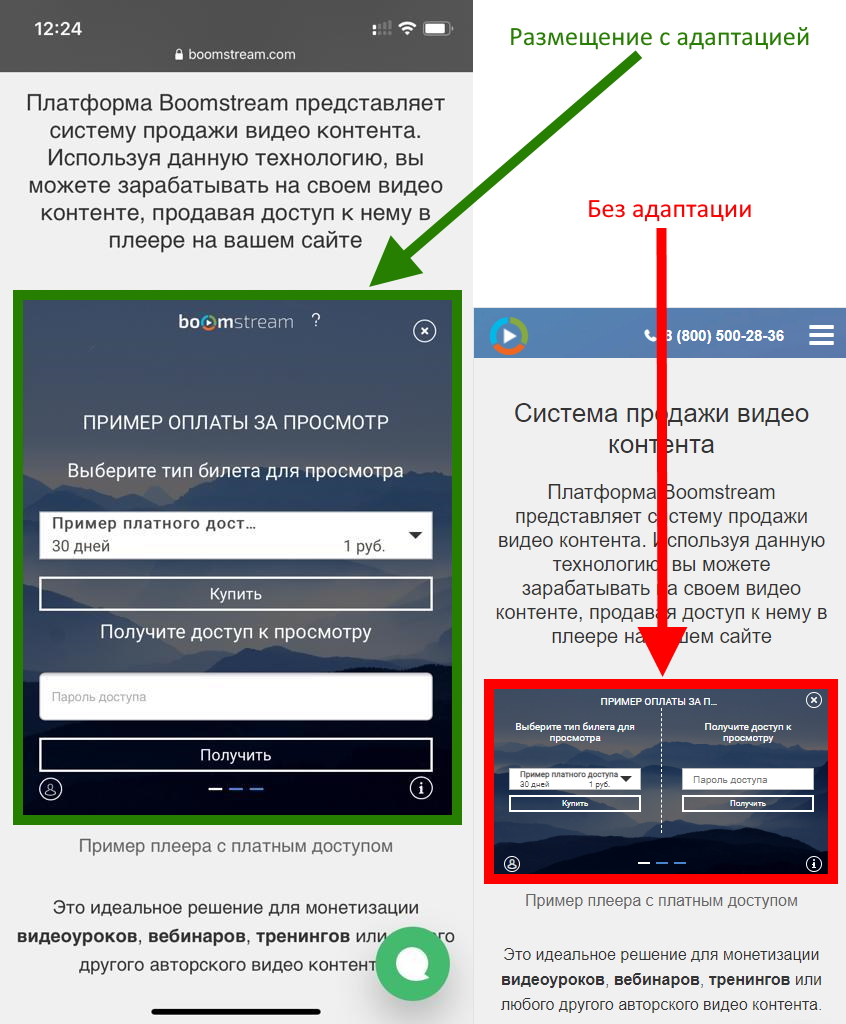
Mobile View Example
The player displays perfectly on mobile devices, including videos with paid access:
Compatible Content Types
This responsive iframe code works with:
- ✅ Regular Boomstream videos
- ✅ Live streams
- ✅ Playlists
- ✅ Videos with paid access
- ✅ Videos with password protection
All content types maintain full responsiveness across devices while preserving access controls and functionality.
Result
Your Boomstream player will now:
- Display correctly on all devices (smartphones, tablets, desktops)
- Maintain 16:9 aspect ratio automatically
- Provide optimal viewing experience without manual zooming
- Adapt seamlessly from mobile screens to wide-screen monitors
No further configuration needed — the responsive iframe is ready to use!